Turn everyday efforts into exciting rewards.
Whether you're raising happy kids or building a motivated team, PiggyKu makes every achievement count. Set challenges, celebrate progress and reward the people who matter.
PiggyKu is in testing on Android, by invitation. How to join
Lala's jobs this week
- Tidy your room+20
- Read a book for 20 minutes+30
- Help set the table+15
Well done, Lala!
– Mum
120 coins
Pak Budi stayed until closing to clean the kitchen.
Lala, Pak Budi and Bu Ratna are examples, not real users.
Made for families. Built for teams. Ready for everyone.
One account can start or join as many groups as life needs: the family at home, the team at work, the futsal club on Sundays. Each keeps its own people, rules and rewards.
Make good habits fun
Turn everyday responsibilities into exciting challenges. Encourage children to learn, help at home, stay active and save towards their favourite rewards.
Explore family rewardsMotivate your team. Celebrate every win.
Recognise employee achievements, create challenges, manage rewards and build a culture where every contribution matters.
Explore business rewardsA Sunday futsal club
Your group. Your rules. Your rewards.
Create your own reward ecosystem for clubs, communities, schools and other organised groups.
Discover custom groupsSix steps, from a first quest to a first reward
See the full walkthroughStep 01
Create your group
Choose Family, Business or Custom. Each starts with ready-made levels, words and rules.
Step 02
Build your team
Add people and organise your group into levels. Everyone has one person directly above them.
Step 03
Set challenges
Create quests and give each a coin reward, a deadline and the proof you need.
Step 04
Earn coins
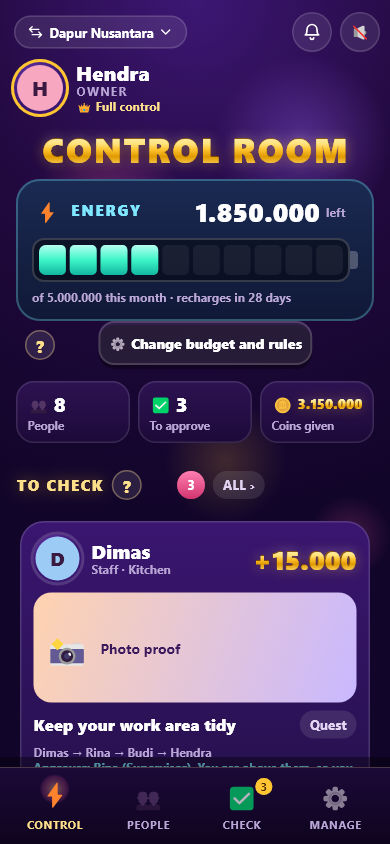
Members complete challenges and submit proof, such as a photo.
Step 05
Approve achievements
The right person above reviews it and says yes. That yes is what moves the quest's coins.
Step 06
Redeem rewards
Members ask for cash or listed rewards (goods with Launch), which are handed over outside the app.
Every achievement deserves recognition.
A coin is a small, visible thank-you. Members always know how many they have, what they can earn next and who approves it.
Lala's coins, once she has asked for the ice cream
Illustrative- Earned
- 390
- Every coin ever given as a reward
- Available
- 100
- Ready to save or swap
- On hold
- 50
- In a reward request that is waiting
- Locked savings
- 120
- Set aside in a savings goal
One coin's journey
Coins are not money
Coins are reward units inside PiggyKu. They are not cryptocurrency, not a payment and not transferable money, and they cannot be sent between members. The group owner decides what a coin is worth, or that it has no cash value.
Features that make a difference
Sixteen of them, in three groups. Each says when it arrives: Preview is the test version today, Launch is version 1.0 in the app stores.
Lala
Read a book for 20 minutes
Illustrative
01
The everyday loop
What every group uses: a quest, proof, a yes, coins, a reward. All of it is in the test version.
PreviewIn testing
Custom groups and hierarchies, Challenges and tasks, Approval workflows, Coin rewards, Reward redemption, Notifications, Activity history
PreviewLaunchPartly in testing
Voice notes and photo proof
Lala
Blue bicycle
Illustrative
02
At home
Saving towards something, and a moment for every win. Child members managed by a parent come with Launch.
PreviewLaunchIn testing
Achievement celebrations
LaunchIn testing
Coin Lock and savings goals
LaunchPlanned
Parent-managed child members
Stayed until closing
Illustrative
03
At work
The team as a tree, reports and awards today; tips, bonuses and attendance with Launch.
PreviewIn testing
Team management
LaunchIn testing
Reports and analytics
LaunchPartly in testing
Employer bonuses
LaunchPlanned
QR-based tip recording, Attendance and shift management
For families
Little tasks today.
Big habits tomorrow.
Meet Bu Rina in Bekasi. Lala is eight, Dimas is eleven, and they both want the same blue bicycle. So the fridge door got a chore chart, and the kitchen shelf got a jar.
An example family. The chores are very real.
Things children really do for coins
- Homework done before dinner+20
- Read a book for 20 minutes+30
- Tidy your room+20
- Help with the dishes+15
Savings goal
The bicycle fund
120 of 400 coins
280 to go
Coins in a savings goal are set aside. When the goal is reached they come back to Available, and the family hands the bicycle over.
Celebrate effort. Build responsibility. Make learning rewarding.
Child members are managed by a parent: the parent creates the child's place in the group, with no phone number or email needed. This comes with Launch.
Explore family rewardsFor businesses
Recognition that drives performance.
Give your employees a reason to go the extra mile. Make recognition measurable, transparent and rewarding.
At Warung Ratna in Yogyakarta, Pak Budi stayed until closing to clean the kitchen. Bu Ratna saw it. A few taps later he had 50 coins, and the team's history shows exactly why.
Warung Ratna
This month · November
- Active challenges
- 18
- Coins awarded
- 12,500
- Pending approvals
- 6
- Team members
- 48
Coins awarded per week
Everything your team gets, and where each part stands today →
Better recognition. Happier employees. Stronger teams.
Saved 120
Earn it. Save it. Enjoy it.
Coins become whatever the group decides: cash, something from the reward list, or a goal worth waiting for. Goods and vouchers join with Launch.
Cash rewards
The owner sets what a coin is worth. Cash is handed over by the group, outside the app.
Shopping and merchandiseLaunch
Goods the group offers, like a staff meal or a new football.
Gift cards or listed rewards
Items on the group's reward list, each with a fixed coin price. Gift cards, as vouchers, come with Launch.
Savings goals
Save towards something bigger, coin by coin, and watch it fill.
Coin Lock
Set coins aside until a date: 1, 3 or 6 months, or the lengths your group offers. On that date the same coins come back. No interest, no bonus, nothing deducted. Family groups use it as a savings goal.
PiggyKu does not hold, transfer or pay money. Rewards are handed over outside the app by the group owner.
The usual way
- Manual tracking on paper or in a chat
- Recognition nobody can point to later??
- Rewards handled informally
- Approvals that are hard to follow
- Little visibility for anyone
Why PiggyKu?
Most thank-yous get lost. These don't.
With PiggyKu
- Structured challenges
- Transparent coin balances
- Defined approval workflows
- Configurable budgets
- Traceable activity history
- Flexible reward management
A comparison of ways of working, not of other products.
Rewards with transparency and control.
Every coin has a person behind it
Configurable budgets
The owner sets how many coins the group can give per day, week or month. When it runs out, approvals stop, unless the owner has turned the stop into a warning.
Traceable coin activity
Every coin can be followed from what earned it to what it was spent on. History cannot be changed.
Access per group
Each group is separate. Rights apply only inside a person's own branch, and the server checks them.
A second check for sensitive steps. Marking a reward paid, adjusting coins or changing rules asks for the PIN again.
Careful with data. Only the data a feature needs is collected. Proof photos are private to the people above the sender.
No advertising. No ads, in the app or on this website.
No sale of member data. Member data is never sold. It is kept on a server in Southeast Asia (Singapore).
Ready to make every achievement count?
Bring more motivation, recognition and rewards into your everyday life with PiggyKu.